

Project Background
I partnered with a brand new nonprofit: The Center for Working Families. Their mission is to educate people with financial independence tools. They also aim to make housing more accessible to first time homebuyers. They also have career education services for individuals looking to upskill.
Goals
The Center for Working Families has only been around for a month. They needed help with creating their online presence. The objective was to create a minimum viable product of a landing page to give to clients for an upcoming career fair in November.
Time Frame
July 2025 - September 2025
My Role
UX + UI Design, Visual design, Branding, User flow, Research, Prototyping + Testing
Tools
UX Pilot, Figma, Canva, Squarespace, Wix
The Challenge
-
Brand new non profit doesn't have a lot of content to show on website.
-
When setting up a business, other priorities took precedence, so the website was not highest priority (meet infrequently)
-
Changing requirements/design decisions constantly .
My Design Process

Background
The Center for Working Families is a brand new non profit organization that had only been around 1 month. I needed to understand where this organization was in terms of their strategy so I held a meeting with their CEO to understand more of the company's vision, objectives, and needs.
CFW Stakeholder Interview
.png)
Based on the compiled information, the CEO is a mission-driven visionary who balances a passionate commitment to a generational cause with the pragmatic realities of leading a nonprofit.
She perceives financial independence as both an educational process and a critical human need in a housing crisis. While she struggles with a demanding schedule, her core focus is ensuring that the organization's unique value proposition is not lost in translation and that every external communication, like the landing page, clearly reflects the companies deep-seated values and achieves measurable, long-term impact.
Market Research
The next phase of research began with an exploration of current market trends and user needs. I conducted a competitive analysis of four other direct and indirect non profit organizations. All four competitors had varying features and catered to or met diverse needs.
CWF COMPETITOR ANALYSIS

Pain Points

People feel frustrated that they cant save money & build wealth.

People feel like they will never be able to afford a house.

People don't know what resources their community provides.
Personas
I gathered the data found from our competitive analysis and our pain points to create two user personas that represent our target audience


How Might We empower individuals to leverage our employment, community, and financial resources so they can achieve homeownership and financial independence
Wireframing
Iteration #1
I decided to use a new tool called UX pilot that would help me generate multiple layouts as a starting point. Here are my prompts and its generated output
.png)
Prompt #1
Design a non profit landing page. It should include "financial wellness", "community resources" and "employment" as its 3 pillars. There should also be a donate now button, and a contact form. Add some text underneath the hero image
Prompt #2
Make the hero image go across the length of the page and then put the text and buttons underneath.
_edited.png)
.png)
Prompt #3
Add this picture here and make the whole mockup background black
What our participants did not like
1. User did not like the layout of the information here. It felt cramped.
2. Users did not like this picture here. A suggestion was to use this picture on a following page.
3. Did not like the dark theme of the landing page.
4. Success stories are nice to have but since we are so new, we don't have feedback yet to include here.
.png)
Iteration #2
After more iterations, this is the hi fidelity mockup I decided to come up with. This was created in Squarespace and we left it in an unpublished state.
What I like about the design:
1. Hero image shows many people from diverse background all helping each other - this resonates with our mission statement.
2. "From Uncertainty to Opportunity" is an eye catching header that grabs the user's attention.
3. Liked the layout of the cards and how the bullet points convey the services they offer.

First Usability Study
I tested this high fidelity prototype on 3 participants. I wanted to test: visual design, content structure, and typos. The participants gave their feedback(right) that I used in the next round of iterations.
What our participants did not like
1. Impact statement is just two text boxes, and thought the design was too basic.
2. Did not like this design, thought this design may be better on a following page and not the landing page.
3. Voted that they wanted this section redesigned.
4. Voted not to have our location on the landing page for privacy reasons.
At this point in the project, I noticed the CEO was unsure about what direction the landing page should go...

Iteration #3
I decided at this point to go back to a mid fidelity design and just to get the overall content of the website down first before adding all the colors.
What I like about the design:
1. The subheadings are now horizontal and easier to read.
2. We were missing an impact statement before we got to our services.
3. Liked the contact us and menu form better than the original design.

Second Usability Study
I held a second usability study in order to collect feedback of the newest design. Here are the results of the study:
Second Stakeholder meeting
I decided to have a second stakeholder meeting because it felt like I was not capturing the essence of the landing page in her eyes. I asked her these questions:
Tell me about the time when you bought your first house? how did you feel?
Give me examples of how you helped teach financial independence to others in real time?
What I learned from this conversation is these topics are very emotional to her and the people she is trying to help. This landing page needs to capture these emotions.

Aha! I need to design a landing page where users see themselves on the website.
Before

1. It's an impact statement but one that is not powerful enough
2. Text is just floating on the page, could use a design to enhance it
After

1. The CEO initially did not want an impact statement but then requested an impact statement to be added so I found some relevant statistics that we could add. These stats are here to emphasize a point, and the arrows pointing to the logo show how we are at the center of all these issues.
2. Put our support initiatives text in a horizontal box. This improved the visual design of our message.
Before

1. Grid layout allows us to keep adding services and keep the layout cohesive.
2. Voted that since this is just the landing page, we do not need a button here.
After

1. The Z pattern with the color themes of the company enhances visual design of this section. Every participant rated highly of this redesign.
2. The picture of community members helping each other and the joy people are feeling when they buy the house or receiving an offer letter is what we want our clients to feel. This captures the emotions we are trying to convey.
2. I removed the button because they do not need it now.
Before

1. The team wanted to highlight the community partners that they work with.
2. A contact us section gives potential clients a way to inquire about services
3. An embedded google map feature provides visitors with the physical address of the business in case they wanted to visit in person
After

1. Community partners went from just text to enhanced with circles around them.
2. Added a news and events page for upcoming career fairs and events.
3. Added a video of a couple moving into their dream home. They are so excited that they are jumping into each other's arms and smiling. This is how we want to our clients to feel when they find their dream home by using our services.
4. Removed the Geolocation and made the CONTACT US form smaller.
Putting it all together
The images below are what the final landing page that went live looks like (I had to make the image on the right smaller for readability)
Before


After


Key Performance & Indicators
Our KPI's come from the initiative by our client wanting to have at minimum a landing page to show potential clients for an upcoming career fair in October 2025. We were able to deliver on our promise of a stunning landing page. Check out or results below:
).png)
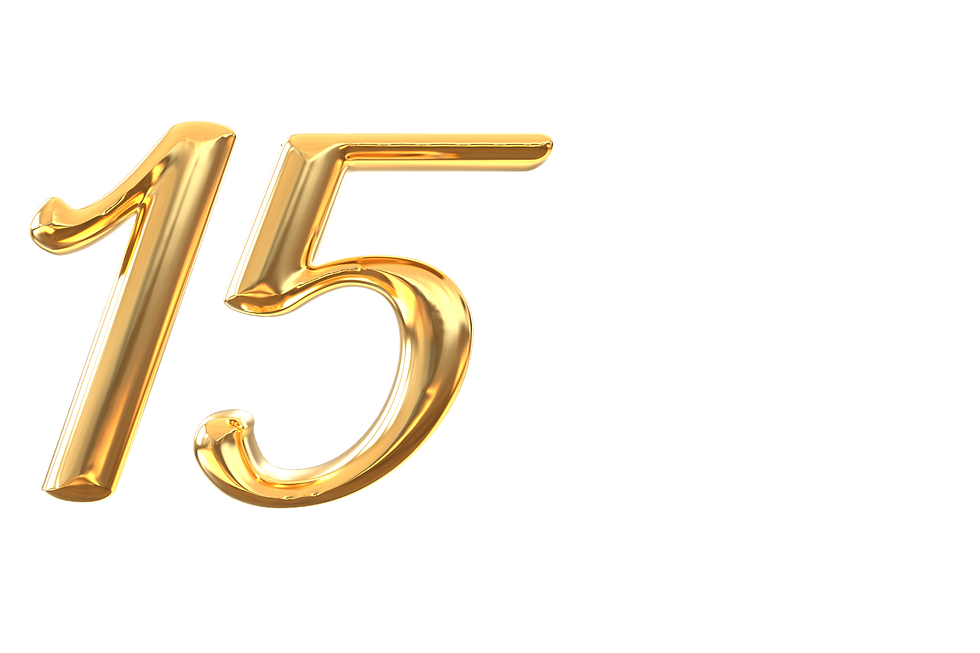
CWF received 15 submissions inquiring about services from people that attended the conference.

Over a hundred users have gone to the website post launch for an average of 12 seconds per visit.

The landing page I created was a primary factor in securing a seven-figure government grant for CWF.
Next Steps
The next steps for helping the Center for Working Families are:

Build out the following pages: Financial Wellness, Housing, CWF Cares, and Employment Services

Setup a CMS to manage blog posts, upcoming conferences, and job postings

Identify an areas of additional help e.g social media campaigns and outreach
Lessons Learned
My timeline for this project was very long and it still took me much longer than expected. This was my first real world project with a real client. Some of my takeaway’s are:
-
This was a project where I am creating a website from scratch, and the clients the CEO is trying to serve are just as important as how she feels about the website herself. She knew her vision for the company but did not know how to convey that on a website. If I had discovered that she did not know what she wanted earlier on, I could have framed some of the questions, research, and design decisions around that, and it would have sped up the deliverable. We did multiple website revisions because I did not take that into account. My initial questions and decisions were more about her users and not factoring the CEO as a user herself. An example question: Walk me through a time when you helped someone find the house of their dreams?
-
UX pilot is a program that requires prompting for mockup generation. Prompting for mockup generation is still in its infancy. I would generate a mockup and it would still come out wrong. The problem with this is that I was paying for tokens so I would be spending tokens on output that I wasn't satisfied with. I ended up having to pay more to have more tokens and then I would also have to manually change things on the mockup to save on tokens and to speed up the process.
Prompting is a skill that needs to be mastered, and I am looking into prompting courses to take in the future